
How Jax's Suds Club works
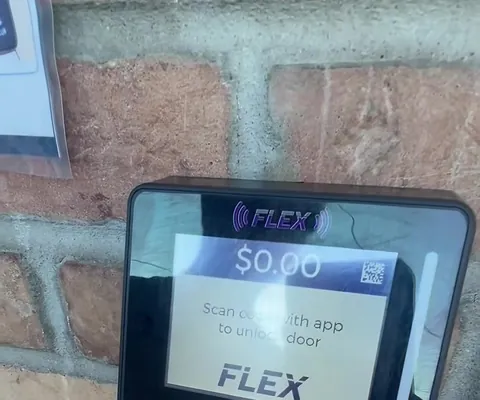
Download the FasCard app, join Jax's Suds Club, scan the QR code on the reader by the door to unlock it, then start any machine with the app, a loyalty card or coins. No smartphone? Call and we'll buzz you in.
Step by step
Four steps to get in
Get the FasCard app
Download the free FasCard app from the App Store or Google Play and create an account.
Join Jax's Suds Club
In the app, look for Jax's Suds Club and join the loyalty program - your digital card is ready. Prefer a card? Print one at the kiosk just inside the entrance.
Scan the door reader
When you arrive, open the app and scan the QR code on the card reader next to the door (upper right). The door unlocks.
Start any machine
Use the same app or your loyalty card to start any washer or dryer. All machines take coins too.
No smartphone, or need a hand? Call (608) 412-4263 (primary) or (507) 470-9439 (secondary) and we'll buzz you in so you can use the kiosk and get your loyalty card.
Your card
App or loyalty card
Two ways to carry your membership - pick either one:
- Option A - the FasCard app (recommended). Download it, create an account, find Jax's Suds Club and join the loyalty program. Your digital card is ready to use.
- Option B - a physical loyalty card. Stop inside and use the kiosk to print your card. The kiosk is just inside the entrance to the right and takes cash or card. It also reloads your card.
- By mail. Email [email protected] and we can set up an account for you and mail you your card.

In the app
What the FasCard app does
- See which machines are free, and the time left on machines in use, before you leave home
- Add money to your account inside the app
- Get a notice in the app or by email when your cycle is done
- See your full transaction history
Features of the FasCard app by Card Concepts Inc.
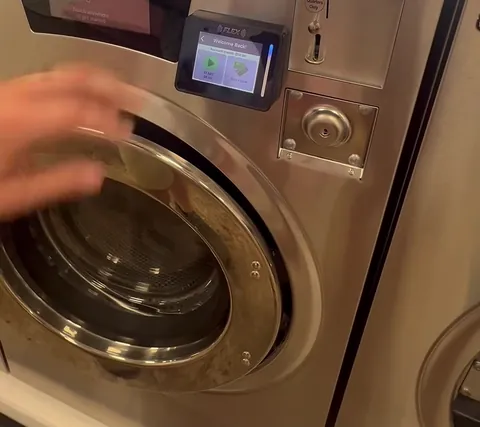
Starting a machine: tap the scan icon in the app (Quick start machine) and scan the code on the machine's reader, or tap your loyalty card. Coins work on every machine too.
FAQ
Getting started questions
How do I get in the door?
Open the FasCard app and scan the QR code on the card reader next to the door (upper right side of the reader). The door unlocks. You need the app or a loyalty card to get in.
I don't have a smartphone. Can I still use Jax's?
Yes. Call (608) 412-4263 (primary) or (507) 470-9439 (secondary) and we'll buzz you in so you can use the kiosk and get a physical loyalty card.
Do you take quarters?
Yes - all machines are coin operated as well. You still need the app or a loyalty card to get in the door.
Where is the kiosk and what does it take?
The FasCard kiosk is just inside the entrance, to the right. It prints and reloads loyalty cards and takes cash or card.
Can you mail me a loyalty card?
Yes. Email [email protected] and we can set up an account for you and mail you your card.
Can I see which machines are free before I come?
Yes. The FasCard app shows which machines are available and the time left on machines in use, so you can check before you leave home.
Will the app tell me when my laundry is done?
Yes. You can get a cycle-done notice in the FasCard app or by email.
Get in touch
Stuck at the door? Need a card?
Call us, or send a note and we'll help you get set up.